5 Hidden Features of the Arctis 5 2019 Edition You Must Know About
SteelSeries' Arctis 5 2019 Edition is often marketed as a mid-range gaming headset that balances features and price. Beyond its visible design cues — ski-goggle suspension, retractable ClearCast mic, and RGB lighting — the Arctis 5 packs several lesser-known capabilities that meaningfully affect day-to-day use for gamers, streamers, and remote workers. This article uncovers five of those hidden features, explains how they translate into real-world value, provides a detailed review and analysis, lists pros and cons, offers a platform comparison, and closes with a practical buying guide for potential buyers.
Introduction
In a crowded headset market, product specs and promotional images do not always reveal how a device will perform in the moments that matter. The Arctis 5 2019 Edition sits between entry-level headsets and premium wireless models, but several built-in functions — hardware and software — give it flexibility that often goes unnoticed. Knowledge of these features can help prospective owners decide whether this is the right tool for competitive play, content creation, or daily communication.
Five Hidden Features and Why They Matter
1. Hardware ChatMix Dial — Instant Game/Voice Balance
One of the most practical yet underrated hardware features is the ChatMix dial that sits on the inline USB DAC. Rather than changing levels in software, the dial provides an immediate, tactile way to blend game audio and voice chat. In real-world scenarios — an intense ranked match while coordinating with teammates on Discord or a live stream that needs on-the-fly volume corrections — flipping the dial prevents fumbling through menus.
Use case: During multiplayer matches, the ChatMix dial allows quick prioritization of game cues (footsteps, gunfire) or voice (callouts, co-commentary) without alt-tabbing or breaking focus.
2. DTS Headphone:X v2 and Per-Profile Audio Tuning
With SteelSeries Engine installed, the Arctis 5 can leverage DTS Headphone:X v2 spatial processing. This virtual surround solution, when properly configured, improves positional awareness in FPS titles and enlarges perceived soundstage for single-player immersion. The hidden advantage is not just surround sound itself but the ability to save and switch EQ and surround profiles per game or activity.
Use case: A saved profile emphasizing mid/high frequencies can help in shooters to make footsteps clearer, while a separate profile boosting low-end can provide fuller sound for cinematic gaming or music listening.
3. The USB DAC Acts as a Lightweight Sound Card
The Arctis 5’s USB interface is more than RGB power; it exposes the headset as a discrete audio device in the operating system. This makes it possible to route applications independently (game audio through the headset, system audio elsewhere) and apply software-level processing to the headset signal only. For streamers and content creators, this allows cleaner routing and less reliance on third-party mixers.
Use case: During a stream, game audio can be sent to the Arctis 5 while music or browser sound is muted from the broadcast mix, or vice versa — all without additional hardware.
Discover deals on Audio & Headphones — updated daily.
View Offers →4. Retractable ClearCast Microphone with Mute-on-Stow and Sidetone Support
The ClearCast microphone on the Arctis series is frequently praised for its conversational clarity. The retractable design doubles as a mechanical mute: stowing the mic mutes the signal instantly. A less obvious but valuable capability is mic monitoring (sidetone) available through SteelSeries Engine or system-level settings, which helps maintain natural speaking volume and avoids shouting into the mic during calls or streams.
Use case: Remote meeting attendees benefit from sidetone to avoid talking too loudly; streamers appreciate the tactile assurance that retracting the mic mutes background noise immediately when the camera is off.
5. Engine-Driven RGB and GameSense Integration
While RGB is often cosmetic, the Arctis 5’s lighting can be integrated with SteelSeries GameSense to react to in-game events (health, ammo, cooldowns). This is a hidden productivity and accessibility tool: visual cues reduce reliance on sound alone and can signal critical events when audio focus is on other tasks or when personal hearing acuity varies.
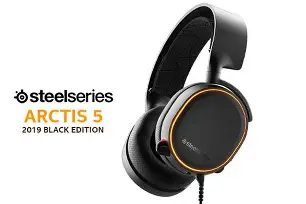
Use case: During fast-paced matches or multitasking streams, a peripheral visual alert for low health or incoming messages can reduce missed cues and enhance response time.
Detailed Product Review & Analysis
Design and Build Quality
The Arctis 5 2019 Edition presents a functional aesthetic: a steel-reinforced headband with the ski-goggle suspension provides instant comfort customization, and the earcups are wrapped in breathable AirWeave fabric to reduce heat accumulation. The overall construction feels durable for the price range, with reinforced joints and a low profile that suits both desktop setups and living-room console play.
Comfort and Long-Session Wear
Long sessions reveal the Arctis 5’s strengths. The suspension headband distributes weight evenly, minimizing pressure points on the crown. The earcup padding and fabric choice are favorable for glasses wearers and those prone to ear sweating. The headset’s weight and clamping force strike a balance that fits many head shapes without excessive force.
Sound Quality and Signature
Out of the box, the Arctis 5 leans toward a slightly V-shaped sound signature: elevated lows and highs with clean mids. This makes it engaging for FPS and action titles where bass impact and treble clarity matter. With SteelSeries Engine and DTS enabled, the soundstage broadens, aiding in positional cues. Music reproduction is competent; audiophiles will note limits in refinement compared to higher-end headphones, but the Arctis 5 performs well for in-game audio and casual listening.
Looking for the best Audio & Headphones deals on Amazon?
View Offers →Microphone Performance
The ClearCast microphone offers strong vocal intelligibility and effective background noise rejection. Its bi-directional pickup and software processing keep voice natural while suppressing room noise. In practice, teammates report clear comms during matches, and stream chat can rely on the mic for commentary without substantial post-processing.
Software and Customization
SteelSeries Engine remains the hub for the Arctis 5’s features: EQ presets, per-game profiles, surround configuration, RGB customization, and mic monitoring. The software’s profile management is beneficial for those who switch between competitive games and multimedia frequently. A caveat: full feature access is primarily on PC via the USB interface; consoles using only 3.5mm lose DSP features.
Connectivity and Latency
Wired USB connectivity offers near-zero latency and consistent performance. The 3.5mm analog connection maintains compatibility with consoles and handheld devices, but lacks access to the USB DSP features. For competitive play where latency and consistent audio behavior matter, the wired USB path is recommended when available.
Pros & Cons
Pros
- ChatMix dial: Immediate hardware control over game/voice balance.
- Comfort: Ski-goggle suspension and breathable ear cushions for long sessions.
- ClearCast mic: High intelligibility and practical mute-on-stow design.
- USB DAC features: Acts as a lightweight sound card for routing and DSP processing.
- Software ecosystem: SteelSeries Engine offers EQ, per-game profiles, and RGB/GameSense integration.
Cons
- Platform limitation: Many advanced features require SteelSeries Engine on PC; 3.5mm use on consoles disables DSP and RGB functions.
- Not audiophile-grade: Sound performance is excellent for gaming but lacks the resolution of high-end audiophile headphones.
- Non-detachable cable: The fixed cabling reduces modularity for travel or replacement.
- Software dependency: Full value requires regular software updates and occasional reconfiguration.
Comparison Table
| Model | Connection | Surround | Hardware ChatMix | Wireless | Best for |
|---|---|---|---|---|---|
| Arctis 5 (2019 Edition) | USB + 3.5mm | DTS Headphone:X v2 (PC) | Yes (hardware dial) | No | PC gamers seeking DSP features and comfort |
| Arctis 3 | 3.5mm (USB via adapter) | Virtual surround (limited) | No (software only) | No | Console players wanting simple, cross-platform use |
| Arctis 7 | Wireless (2.4 GHz) + 3.5mm | DTS Headphone:X v2 (via Engine) | Yes (via software and base station) | Yes (wireless) | Wireless competitive players and streamers |
| HyperX Cloud II | USB + 3.5mm | Virtual 7.1 surround (USB) | No | No | Value-focused gamers who want straightforward virtual surround |
Buying Guide: Is the Arctis 5 2019 Edition Right for the Buyer?
Several decision factors determine whether the Arctis 5 fits a buyer’s needs. The following checklist helps align purchase intent with the headset’s strengths.
Platform and Feature Priorities
- Primary on PC: If PC gaming and software customization matter, the Arctis 5 unlocks its full potential (DTS surround, EQ, profiles, GameSense).
- Console-first: Buyers who primarily play on consoles should expect a functional analog experience via 3.5mm but will miss USB DSP features.
Comfort and Session Length
- Extended sessions: The suspension headband and AirWeave ear cushions make the Arctis 5 well-suited for multi-hour sessions, competitive ladders, or long remote workdays.
- Glasses wearers: The gentler clamping force and cushion design help reduce pressure on frames.
Content Creation and Streaming
- Streamers: The USB DAC and per-application routing simplify audio management. ChatMix hardware is useful when interacting live with moderators or co-streamers.
- Podcasters/Interviewers: The ClearCast mic achieves clear voice capture without needing an additional microphone in many casual setups, although professional studios may still prefer a dedicated XLR microphone.
Technical Considerations
- Software dependence: The best features require SteelSeries Engine; corporate or locked-down systems that block driver installs will prevent access to software-driven functions.
- Future-proofing: The wired design avoids battery-degradation concerns, but non-detachable cables and lack of modular components may reduce long-term repairability.
Value and Alternatives
For buyers prioritizing flexible on-headset control (ChatMix, mute-on-stow), a responsive mic, and software customization on PC, the Arctis 5 is a strong mid-range option. Those needing wireless freedom should consider the Arctis 7. For minimal software reliance and console-centric use, a 3.5mm-first headset such as the Arctis 3 or other value headsets may be more straightforward.
Real-World Tips and Tricks
- Set per-game EQ profiles: Create a “competitive” profile emphasizing highs and mids for FPS games and a “cinematic” profile with enhanced lows for story-driven titles.
- Use ChatMix for co-op coordination: In tournaments or long co-op sessions, preset the dial so team communications are dominant before a match begins to avoid in-match tweaking.
- Enable sidetone when streaming or in long conference calls: Sidetone prevents inadvertent shouting and keeps natural conversational dynamics.
- Leverage GameSense sparingly: Assign critical alerts to RGB cues only for events that require immediate attention; too many reactive effects can be distracting.
- Keep firmware and Engine updated: Periodic updates resolve compatibility issues and can add refinements to DSP and mic processing.
Conclusion
The Arctis 5 2019 Edition is more than a well-built mid-range headset; it packs several practical features that enhance everyday use for a wide range of buyers. The hardware ChatMix dial, USB DAC functionality, DTS Headphone:X v2 spatial tuning, practical microphone behavior, and Engine-driven lighting and profiles are features that change the ownership experience — often for the better. For PC users who value customization and immediate control over game and voice audio, the Arctis 5 offers an efficient combination of comfort, clarity, and software-driven flexibility. For those focused exclusively on console use or audiophile-grade listening, the trade-offs are worth noting, but the headset still represents a balanced choice for mixed-use buyers. Understanding these hidden features helps align expectations and get the most practical benefit from the Arctis 5 in real-world scenarios.