A Professional's Take on the New Thermal Master P1 Mobile Thermal Camera
Thermal imaging technology was once the exclusive domain of military personnel, high-end industrial inspectors, and scientific researchers. The hardware was bulky, the software was proprietary and difficult to navigate, and the price tags often rivaled the cost of a mid-sized sedan. However, the last decade has seen a radical shift toward miniaturization and democratization. The Thermal Master P1 Mobile Thermal Camera represents the latest evolution in this trend, bridging the gap between hobbyist-grade gadgets and serious professional tools. By leveraging the processing power of modern smartphones, this ultra-portable device aims to provide high-resolution thermography without the traditional overhead of dedicated handheld units.
For professionals in fields ranging from HVAC diagnostics and electrical maintenance to building inspections and automotive repair, the arrival of a new entry like the P1 is met with both excitement and healthy skepticism. A mobile-tethered camera must do more than just show "hot and cold" spots; it must provide accuracy, thermal sensitivity, and a software ecosystem that facilitates fast reporting. In this detailed analysis, we explore whether the Thermal Master P1 meets these professional standards or if it remains relegated to the realm of high-tech novelty.
Understanding the Hardware: Resolution and Sensitivity
The core of any thermal camera is its microbolometer, the sensor that detects infrared radiation. Professionals typically look for two primary specifications: IR resolution and Thermal Sensitivity (NETD). The Thermal Master P1 enters the market with a competitive resolution of 256 x 192 pixels. While this might sound low compared to the megapixels of a standard smartphone camera, in the world of thermography, 256 x 192 is a significant threshold. It provides 49,152 individual temperature measurement points, which is ample for identifying heat signatures on circuit boards, finding moisture intrusion in walls, or spotting overheating bearings in machinery.
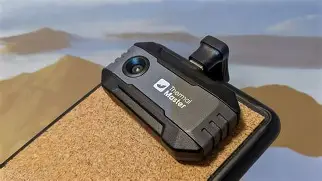
Beyond raw resolution, the P1 boasts a thermal sensitivity of less than 50mk (milliKelvin). This is a critical metric for professionals. A lower NETD value means the camera can distinguish between smaller temperature differences. In practical terms, a 50mk sensitivity allows an inspector to see the subtle temperature variations caused by a failing stud behind drywall or the slight heat buildup in a loose electrical connection before it becomes a fire hazard. The hardware is encased in a robust, compact housing designed to plug directly into a USB-C port, making it compatible with the vast majority of modern Android devices and recent iPhone models.
Professional Use Cases and Practical Applications
The versatility of the Thermal Master P1 is perhaps its strongest selling point. Because it uses the smartphone's screen, the user benefits from high-definition displays that far surpass the grainy, low-resolution screens found on entry-level dedicated thermal cameras. This clarity is essential across several professional sectors.
HVAC and Plumbing Diagnostics
In the HVAC industry, time is money. Technicians can use the P1 to instantly visualize airflow through vents, identify blockages in radiator coils, and detect leaks in refrigerant lines. In plumbing, the camera excels at locating hot water pipes behind walls or identifying clogs by observing temperature changes in the pipe surface. Detecting underfloor heating malfunctions becomes a trivial task rather than a destructive guessing game.
Electrical Maintenance
Electrical contractors benefit significantly from "preventative maintenance" workflows. By scanning a breaker panel with the P1, an electrician can immediately spot a "hot" breaker that is drawing excessive current or a high-resistance connection that needs tightening. This non-contact method of inspection is not only faster than manual probing but also significantly safer, as it allows the professional to maintain a safe distance from live high-voltage components.
Building Science and Insulation Audits
Energy auditors use thermal imaging to justify their recommendations to homeowners and commercial building managers. The P1 can reveal "thermal bridges"—areas where insulation is missing or compressed, allowing heat to escape. During the winter months, an inspector can stand outside a building and see exactly where energy is leaking, providing visual evidence that is far more persuasive than a written report alone.
Software: The Unsung Hero of Mobile Thermography
A mobile thermal camera is only as good as its companion application. Thermal Master has invested heavily in an interface that balances ease of use with professional functionality. The app provides various color palettes—such as Iron, Rainbow, White Hot, and Black Hot—each suited for different scenarios. For example, "Iron" is excellent for general mechanical inspections, while "White Hot" is often preferred for security or search-and-rescue applications.
Discover deals on Cameras & Photography — updated daily.
View Offers →Key professional features within the app include temperature analysis tools like point measurements, line profiles, and area boxes. Users can set "Isotherms," which highlight all objects within a specific temperature range, making it easy to identify any component that exceeds a predetermined safety threshold. Furthermore, the ability to take "dual-spectrum" photos—blending the thermal image with a standard visual image from the phone's camera—adds necessary context to reports. When a client sees a thermal smudge, they might not know what they are looking at; when that smudge is overlaid on a clear photo of their fuse box, the problem becomes undeniable.
Detailed Comparison to Industry Standards
To understand where the Thermal Master P1 fits in the current landscape, it is helpful to compare it against other common professional-lite and enthusiast cameras. Professionals often weigh the P1 against older dedicated units or more expensive mobile attachments.
| Feature | Thermal Master P1 | Generic Entry-Level Mobile | Typical Professional Handheld |
|---|---|---|---|
| IR Resolution | 256 x 192 | 80 x 60 or 160 x 120 | 320 x 240 or higher |
| Frame Rate | 25Hz | 9Hz | 25Hz - 60Hz |
| Thermal Sensitivity | <50mk | >100mk | <40mk |
| Storage | Smartphone Internal | Smartphone Internal | SD Card / Internal |
| Power Source | Smartphone (Low Draw) | Internal Battery (Requires Charging) | Dedicated Swappable Battery |
The comparison reveals that the P1 sits comfortably in a "sweet spot." It offers a 25Hz frame rate, which provides smooth video—a significant upgrade over the 9Hz limit found on many cameras exported under certain international regulations. A smooth frame rate is vital when panning across a ceiling or following a moving mechanical part, as it prevents the "stuttering" effect that can lead to missed anomalies.
Pros and Cons: A Balanced Assessment
No tool is perfect for every situation. While the Thermal Master P1 offers impressive value, professionals must consider both its strengths and its logistical limitations.
Pros of the Thermal Master P1
- Portability: It is small enough to fit in a pocket, ensuring that the professional always has it on hand without needing to carry a separate equipment case.
- No Internal Battery: Because it draws power from the phone, there is no need to worry about a separate battery degrading over time or forgetting to charge the camera before a job.
- High Refresh Rate: The 25Hz performance allows for fluid scanning and real-time video recording without lag.
- Detailed Reporting: Integration with the smartphone allows for instant sharing of images via email, WhatsApp, or cloud storage, streamlining the communication between the field tech and the office.
- Excellent Build Quality: The metal housing feels durable and capable of withstanding the rigors of a tool bag, provided the connector is protected.
Cons of the Thermal Master P1
- Connector Vulnerability: As with any dongle-style device, there is a risk of damaging the USB-C port or the camera's connector if the phone is dropped or bumped while the camera is attached.
- Phone Case Compatibility: Users with thick, ruggedized phone cases may find they need a USB-C extender if the camera's plug cannot reach the port through the case.
- Battery Drain: While it is convenient that the camera doesn't need its own battery, it will drain the smartphone's battery faster during extended use.
- Fixed Focal Length: Like many compact units, it features a fixed-focus lens. While it performs well at most distances, it may struggle with extreme macro photography of very small PCB components compared to manual-focus professional rigs.
Buying Guide: What Professionals Should Consider
Before investing in a mobile thermal camera like the P1, several factors should be evaluated to ensure it aligns with your specific workflow requirements.
1. Determine Your Required Resolution
If your work involves broad inspections—such as checking for missing house insulation or large industrial leaks—the 256 x 192 resolution of the P1 is more than sufficient. However, if you are a micro-electronics repair technician looking for shorts on microscopic capacitors, you may need to consider if a fixed-focus mobile unit provides the necessary "tightness" for your work, or if you will need a specialized macro lens attachment.
2. Analyze Environmental Conditions
Mobile cameras are generally not as rugged as dedicated, rubberized handheld units. If your work involves climbing through muddy crawlspaces or working in heavy rain, you must ensure your smartphone is also up to the task and that you have a plan to protect the connection point between the two devices.
3. Software Ecosystem
Check the compatibility of the Thermal Master app with your specific smartphone model. Professionals should look for apps that allow for post-processing—meaning you can take a thermal photo in the field and later change the color palette or add temperature markers back at the office. The P1’s software suite is robust, but always verify if it supports the specific report formats your clients require.
Discover deals on Cameras & Photography — updated daily.
View Offers →4. Frequency of Use
If you use thermal imaging once or twice a week, a mobile attachment is ideal. If you are a full-time thermographer doing eight hours of inspections a day, you might find the constant attachment and detachment to your personal phone a bit tedious, in which case a dedicated thermal camera might be worth the higher investment for ergonomics alone.
Temperature Range and Accuracy
The Thermal Master P1 is designed to operate across a broad temperature range, typically spanning from -15°C to 550°C (approx. 5°F to 1022°F). This range covers almost every standard professional application, from refrigeration units to high-temp exhaust manifolds. Accuracy is generally within ±2°C or ±2% of the reading, which is the industry standard for professional-grade thermography.
However, it is important for professionals to understand the concept of emissivity. Different materials (like shiny copper versus matte black plastic) emit infrared radiation differently. Practical professionals prioritize cameras that allow for manual emissivity adjustments within the software. The P1's application includes these settings, allowing you to tell the camera what material you are looking at to ensure the temperature readout is as accurate as possible. Without this feature, a professional tool is little more than a thermometer-shaped toy; with it, the P1 becomes a legitimate scientific instrument.
Integrating the P1 into Modern Workflows
The true power of the P1 is seen in how it changes the "speed of business." In the past, an inspector would take a thermal image, go back to the van, upload the SD card to a laptop, generate a PDF, and email it later that evening. With the P1, the workflow is instantaneous. A technician can take a thermal photo, use the phone’s basic markup tools to circle the problem area, and text the photo to the homeowner while still standing in the kitchen. This immediacy builds trust and often leads to faster approvals for necessary repairs.
Furthermore, for teams, the ability to record thermal video with audio narration directly on the phone is a game-changer. A junior technician can record a 30-second clip of a rattling motor’s heat signature and send it to a senior engineer for a second opinion, all within the same ecosystem. This connectivity is something that many high-end, standalone thermal cameras still struggle to implement as seamlessly as a smartphone-based solution.
Conclusion
The Thermal Master P1 Mobile Thermal Camera is a testament to how far infrared technology has come. It successfully moves past the limitations of early mobile thermal attachments by offering a high-resolution sensor, a fluid 25Hz refresh rate, and a sophisticated software suite that speaks the language of the professional inspector. While the physical connection to a smartphone introduces some logistical considerations regarding ruggedness and port safety, the trade-off is an incredibly portable, high-performance tool that leverages the best display and connectivity technology available today.
For the independent contractor, the facility manager, or the advanced home inspector, the P1 represents an investment that can pay for itself in a single avoided disaster or one correctly diagnosed hidden leak. It provides the clarity and data necessary to make informed decisions without the prohibitive cost of traditional industrial equipment. In an era where "smart" tools are becoming the standard, the Thermal Master P1 stands out as a genuinely useful, professional-grade addition to the modern digital toolbox.