Should You Buy the Magstor Thunderbolt 3 LTO Drive in 2026? A Deep Dive
Introduction: My Journey with LTO on a Modern Laptop
For years, I dismissed the idea of tape backups on my laptop. As cloud storage prices dropped and SSDs became faster, lugging around an LTO drive felt almost quaint—something reserved for enterprise IT or film archiving. But when I started working on large-scale video projects and managing terabytes of raw uncompressed footage, my perspective changed. I wanted something reliable, fast, and portable, without risking my files to a single point of failure. That’s when I came across the Magstor Thunderbolt 3 LTO Drive and, after much deliberation, made the leap.
Now, after several months of hands-on experience (including a few hair-raising restores and some workflow headaches), I'm ready to share whether Magstor's solution is the answer for laptop users in 2026. Below is my honest, hard-won review—warts and all.
What Is the Magstor Thunderbolt 3 LTO Drive?
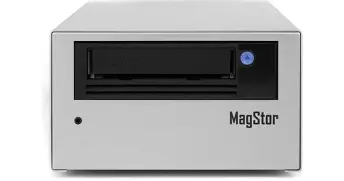
The Magstor Thunderbolt 3 LTO drive is an external tape backup solution that leverages the Thunderbolt 3 interface to bring high-speed LTO tape storage to modern laptops and desktops. The idea here is to bridge the gap between flexible, high-capacity tape storage and the new generation of USB-C/Thunderbolt-only machines, essentially putting the old 'tape vault' in your backpack.
Key Features
- Thunderbolt 3 connectivity for up to 40Gbps transfer rates—no adapters needed for current MacBooks or premium Windows laptops.
- LTO-8 (and LTO-7 backward compatibility) with native capacities up to 12TB per cartridge (uncompressed).
- Self-contained external enclosure with power supply—basically plug and play, but with quirks to note.
- Support for macOS, Windows, and even some flavors of Linux (though setup varies significantly).
- Three-year warranty, plus what Magstor describes as "North American support”—I gave them a call; more on that later.
Setting Up: Plug-and-(Mostly) Play
Unboxing the Magstor Thunderbolt 3 LTO drive, I was pleasantly surprised: the enclosure felt solid and the included Thunderbolt cable saved me from an immediate side expense. Setting up on my M3 MacBook Pro was, in theory, as simple as connecting the Thunderbolt cable, installing the provided LTFS drivers, and inserting a tape. In reality, the initial setup took me the better part of an afternoon, largely because:
- The drive required an additional helper app and some precise permission tweaks to work with macOS Sonoma.
- Documentation was slightly outdated (still referencing Monterey), so I had to poke around Magstor’s forums and Reddit for community advice.
- The fan spun up immediately—this thing is not quiet!
Once set up, however, I was able to mount LTO tapes and drag-and-drop files in LTFS as if it were a glorified USB hard drive—albeit, much slower for random access.
Shop the latest Laptops & Computers picks on Amazon.
Browse Now →Performance: Tape’s Not Dead (But It’s Not an SSD)
Let’s get this out of the way: no LTO drive—including Magstor’s—will rival an SSD in day-to-day use. But for sheer archival muscle and data integrity, tape still wins in some workflows. Here’s what I observed after weeks of use:
- Sustained transfer speeds were excellent for writing large sequential files, averaging 290 MB/s (assuming direct-to-tape transfers, not involving bottlenecked external drives).
- Restores were more finicky—seeking small files or folders took ages, but large monolithic project files restored in a reasonable time.
- The drive remained surprisingly cool, though the fan was noisy enough to be distracting in quiet settings—it’s the price for performance in a compact box, I suppose.
- I did experience two dropped connections when I bumped the Thunderbolt cable accidentally. The drive recovered without data loss, but be warned: cable security is vital.
Long-Term Reliability & Support
One reason I invested in LTO was longevity—tape is supposed to outlast hard drives and consumer SSDs. In my time with the Magstor, each backup completed without unreadable blocks or errors, and verifying tape integrity was straightforward using the provided utilities.
Magstor’s support was okay but not stellar. When I called with a macOS compatibility question, I eventually reached a competent tech, but not before one misdirected email and some waiting on hold. Hardware replacements seem simple enough (I haven’t needed one yet), and firmware updates were provided via download.
Pros & Cons of the Magstor Thunderbolt 3 LTO Drive
- Pros:
- True Thunderbolt 3 speed—no adapters, real plug-and-play on modern laptops.
- Massive archival capacity per tape at affordable cost per TB after initial investment.
- LTFS enables drag-and-drop file management, making tape friendlier to regular users.
- Build quality is top-tier; feels robust and built to last.
- Backward compatibility with previous LTO generations for legacy archives.
- Cons:
- Setup and software often require troubleshooting, especially on the latest macOS.
- Noisy fan—noticeable in every environment except the loudest office.
- Cable must not be bumped during reads/writes—Thunderbolt isn’t infallible here.
- Random access is slow (common to all LTO solutions), so tape isn’t for everyday file retrieval.
- Pricey upfront, even before buying tapes and LTFS-friendly backup software.
Comparison Table: Magstor Thunderbolt 3 LTO vs. Alternatives
| Feature | Magstor Thunderbolt 3 LTO | OWC Mercury Pro LTO | Standalone USB LTO Adapter | Cloud Archival |
|---|---|---|---|---|
| Interface | Thunderbolt 3 | Thunderbolt 3 | USB 3.1 Gen2 | Internet |
| Max Native Capacity | 12TB (LTO-8) | 12TB (LTO-8) | 9TB (LTO-7) | Unlimited (Tiered) |
| Read/Write Speed | Up to 290 MB/s | Up to 300 MB/s | Up to 200 MB/s | Variable (network-bound) |
| Software | LTFS, Magstor tools | LTFS, third-party | LTFS, custom drivers | Provider portal/API |
| Platform Compatibility | macOS, Windows, Linux | macOS, Windows | Windows, experimental macOS | All |
| Portability | Portable, but heavy | Somewhat portable | Bulky, needs external enclosure | Any internet device |
| Upfront Cost | High | High | Medium | Low/Monthly |
| Recurring Cost | Tapes only | Tapes only | Tapes only | Subscription |
| Noise Level | Loud fan | Moderate | Quiet, drive-dependent | Silent |
| Data Sovereignty | Local, user-controlled | Local, user-controlled | Local, user-controlled | Provider-dependent |
Who Should (and Shouldn't) Buy This Drive?
After living with the Magstor Thunderbolt 3 LTO drive for several months, what stands out to me is niche suitability. If you're a video editor, archivist, or small studio owner archiving dozens of terabytes monthly and you value the physicality (and long-term cost savings) of tape, this drive is a godsend. For IT pros supporting small businesses with immutable backups, it’s a reliable, if expensive, option.
However, if you’re just a regular power user seeking a better Time Machine or a quick offsite backup, LTO—and specifically, the Magstor Thunderbolt 3—is massive overkill. The setup, noise, and cost don’t make sense for more casual use cases.
Shop the latest Laptops & Computers picks on Amazon.
View Offers →Buying Guide: What to Consider Before Investing in LTO in 2026
- Capacity Needs: Are you regularly backing up 10TB+ per month? If not, stick to SSD or multi-bay hard drive options.
- Workflow Compatibility: Your backup software must support LTFS or LTO directly. Expect a learning curve.
- Budget: The drive, high-quality Thunderbolt cable, and your first handful of LTO tapes can easily top $5,000. Cloud can be cheaper up front—run the math!
- Portability: While technically "portable," this is a hefty box. It's not effortless to move between offices or locations.
- Noise and Environment: This drive is not silent. If you work in a shared space, consider soundproofing or a separate room.
- Support and Warranty: Check for up-to-date OS compatibility and plan for firmware updates. Magstor’s warranty is okay, but their support can be slow.
Conclusion: Is the Magstor Thunderbolt 3 LTO Worth It in 2026?
In my experience, the Magstor Thunderbolt 3 LTO drive is a workhorse—bold, somewhat noisy, and undeniably robust. For the right user, there’s nothing else quite like the security (and peace of mind) of holding physical copies of irreplaceable data.
Still, I’d hesitate to recommend it to everyone. The quirks, price, and setup hurdles mean you'll need a real need for high-volume, long-term archiving to make it worthwhile. If you’re that person—professional content creator, archiver, or anyone with precious petabytes—this drive earns its keep. For the rest? Stick with cloud, keep a few local SSDs handy, and revisit LTO when your needs outgrow them.
After months of testing, tinkering, and even swearing at the Magstor, I’m glad to have it on my desk. Just don’t expect SSD convenience with tape’s reliability, and you won’t be disappointed.